


Bitwarden Password Manager
4.76.63K Reviews
App Specs
- Version
- 2026.8.0
- Updated On
- License
- Free
- Downloads
- 5,000,000+
- Developer
- Bitwarden Inc.
- Categories
- Productivity
- Platform
- Android, iOS
Screenshots
 Analysis by AppCompare
I started using Bitwarden Password Manager because I wanted one dependable place for the logins that tend to get scattered across browsers, notes, and memory. After spending time with it as a productivity app, I found that its real value is less about flashy extras and more about creating a clear boundary between my accounts and everyone else’s. That matters even more in a household where several people use the same tablet, computer, or phone.
Bitwarden is free, developed by Bitwarden Inc., and available for users aged Everyone. It has built a strong audience, with an average rating of 4.7 from around 172 thousand ratings and more than 5 million installs. Those figures do not replace personal testing, but they do match my impression that this is a mature password tool rather than a small experiment.
How it works when a household shares devices
The most realistic household situation is not that everyone shares one password vault. It is that people share hardware while keeping their online identities separate. I might use a family tablet to check email, while another person uses the same tablet for banking, shopping, school services, or work. A password manager is useful here only when each person understands which account belongs to whom.
Bitwarden helps me keep that separation mentally and practically. I can open my own vault when I need a login instead of leaving credentials in a browser profile that someone else may later use. That small change reduces the chance of choosing the wrong account, especially when several services have similar names or when a saved login is no longer obvious.
There is an important distinction, though: installing the app on a shared device does not magically turn the device into a private space. I would not hand an unlocked vault to another household member and assume that the password manager itself solves access control. The quality of the setup still depends on the device lock, the account credentials, and the habits of the people using it.
For a shared tablet, I would begin by deciding whether every person really needs access from that device. If the answer is no, I would keep the app tied to one person’s use and avoid saving another person’s credentials there. If several people need it, I would make the account boundary explicit before adding any logins. That conversation is more useful than simply telling everyone to “use the password app.”
Creating a clean boundary during setup
My first recommendation is to treat setup as an organizational task, not just an installation step. I would create or sign in to the correct Bitwarden account, confirm whose vault it is, and then add only that person’s credentials. Starting with a few important accounts makes mistakes easier to spot than importing a chaotic collection of old passwords all at once.
Worth Reading Before You Choose

EA SPORTS FC Mobile 26 Is a Bigger Football Game, but It Takes Time

Flipboard Shows What News Apps Must Do Beyond the Feed

Switching to Android Auto Means Rethinking Your Driving Routine

Google Calendar Makes a Crowded Week Easier to Manage

Ludo King Makes the Most of the Minutes Between Plans

Baby Panda World Brings Quick Play to Modern Phones, but Its Game Library Feels Busy
The app is most helpful when I use it as the single source of truth. If I save a new password in Bitwarden but continue keeping copies in a notes app, browser, and paper folder, I have created several competing versions. That makes future changes harder to track. I prefer updating the vault immediately after changing a password and removing the old informal copy.
A practical household rule is to avoid using one shared login simply because the device is shared. A streaming account, utility account, or family shopping account may genuinely belong to the household, but personal email, health services, financial accounts, and work credentials should remain clearly associated with the individual. Bitwarden can store those entries, but it cannot decide the appropriate ownership for me.
I also pay attention to the name and notes attached to an entry. A vague label such as “email” is not very useful when several people use the device. A clearer label identifies the service and the account owner without putting the password itself into a note. This is one of those small habits that saves time later, particularly when someone is helping a less technical family member sign in.
The current version is 2026.7.1, and the app requires operating system version 10 or later. That requirement is worth checking before planning a household rollout, especially if an older phone or tablet is still in regular use. I would not replace a working device solely for this app; instead, I would decide which newer device should handle password access and keep older hardware away from sensitive sign-ins where possible.
Coordinating without mixing everyone’s accounts
Coordination is where many household password systems become confusing. People often want convenience, but convenience can lead to one account being passed around informally. My preferred approach is to agree on which credentials are genuinely shared and which must stay private. The vault then reflects that decision instead of becoming a dumping ground for every password in the home.
For shared services, I would use descriptive entries and agree on who is responsible for keeping them current. If the household changes a shared password, that person should update the stored entry and tell the others that the change is complete. Without that simple responsibility, one person may update a password while everyone else continues trying the old one.
For personal accounts, I would not copy the credentials into a relative’s vault just to make support easier. If someone needs help signing in, I would guide them through the process while they remain the account owner. This preserves a useful boundary: assistance is shared, but the secret itself does not automatically become communal.
Bitwarden works well for this kind of deliberate coordination because it encourages me to look up the exact stored entry instead of relying on memory. It is especially useful when a household has several accounts for the same service, such as separate email addresses or multiple shopping profiles. The trade-off is that organization takes effort. A messy vault is still messy, even if it is encrypted and easier to search than a notebook.
One non-obvious benefit is the ability to make password changes less disruptive. When I update an entry as part of the same task as changing the password on the website, I avoid the common problem of discovering weeks later that the password manager contains an obsolete value. I consider this two-step habit more important than adding dozens of entries quickly.
Age, trust, and the limits of a shared vault
The Everyone age rating makes the app approachable for a broad household, but age suitability is not the same as readiness to manage secrets. A younger user may understand how to tap a saved login without understanding why a personal password should not be shown to a sibling or copied into a message. I would introduce the app gradually, using ordinary examples and explaining that access to a vault is serious.
For an older relative, the challenge may be confidence rather than technical ability. I would help with the initial structure, use recognizable names for entries, and practice retrieving one or two logins. I would avoid taking permanent control of the person’s account merely because setup is easier that way. The goal should be independence, not a new dependency on the family member who installed the app.
Trust also matters between adults. A password manager is not a substitute for an agreement about privacy. Partners or housemates may share some services while keeping other accounts entirely separate. I would be cautious about signing into someone else’s vault on a device that other people can unlock, even if the intention is only to provide technical support.
This is where Bitwarden may not be the right choice for every household. If the main requirement is a tightly managed family arrangement with extensive administrative oversight, I would first examine whether its available account and sharing setup matches that expectation before moving everyone in. If the household is unwilling to decide who owns which credentials, no password manager will make the arrangement comfortable.
Everyday use beyond simply storing passwords
In daily use, I see the app as a place to reduce repeated friction. When I need to sign in on a new device, I do not have to search old messages or guess which variation of a password I used. That is particularly valuable after changing a password, because the new value is recorded where I expect to find it.
I would also use it for accounts that are important but rarely opened. Infrequent services are easy to forget, and those are often the accounts where I am most tempted to reuse a familiar password. Keeping them in the vault lets me create a different credential without relying on memory.
A useful workflow is to clean the vault in stages. I would begin with email, financial services, device accounts, and any login that can reset other accounts. Then I would move to shopping, subscriptions, travel, and less sensitive services. This order gives me better protection early and prevents the project from becoming an exhausting attempt to catalogue every account in one sitting.
I also recommend reviewing duplicate entries after importing or adding accounts manually. Two entries for the same service can cause hesitation at exactly the wrong moment. I would keep the current one clearly named, remove or archive the obsolete record according to my own retention preference, and avoid storing a password in multiple places unless there is a specific reason.
The app’s strength here is focus. It is not trying to be my calendar, notes system, or household task manager. That narrow purpose makes it easier for me to build a consistent habit. The limitation is equally clear: it does not organize the broader family responsibilities around a shared account. I still need a separate way to communicate who handles renewals, account recovery, or service changes.
How it compares with browser storage and other password tools
Browser password storage is convenient for one person on one browser, and I understand why many users stop there. It is already present during sign-in and usually requires little setup. For a household that uses several browsers, phones, or operating systems, however, browser-only storage can become fragmented. My credentials may be available on one device but not another, and shared hardware can blur whose profile is active.
Bitwarden feels more intentional. I open a dedicated vault rather than assuming the browser has the right entry. That extra step can be slower during a rushed login, but I prefer the clarity when multiple people use the same equipment. It also makes me think about which account I am actually opening instead of accepting the first autofill suggestion.
Compared with keeping passwords in a notes app, the dedicated approach is much easier to maintain. A plain note may be quick at first, but it encourages one long list, weak labels, and accidental exposure when the note is shared or backed up casually. Bitwarden gives the information a structure designed for credentials, which changes how I handle updates and retrieval.
Some competing password managers may appeal more to people who want a highly polished premium ecosystem, extensive family administration, or a very guided setup. I would choose one of those alternatives if its particular workflow better matched the household’s expectations. I would choose Bitwarden when I value a focused password manager, want to start without paying, and am comfortable taking responsibility for organizing the vault and explaining the boundaries to other users.
The free price is a major reason it is easy to recommend as a starting point. A household can experiment with a more disciplined login routine without first committing money. Still, “free” does not mean effortless. The cost is paid in attention: deciding ownership, cleaning duplicates, protecting the device, and keeping stored entries current.
Where the experience can feel less convenient
The biggest friction I noticed is that security-conscious behavior sometimes adds a pause. I have to remember the vault rather than relying on a browser’s familiar prompt, and shared-device use demands more care. Someone looking for invisible automation may find that extra awareness annoying.
There is also a learning curve for relatives who have always reused a small set of passwords. They may understand the benefit but still forget where to look or expect another person to retrieve everything for them. I would not introduce Bitwarden during an urgent account problem if I could avoid it. A calm setup session produces better habits than trying to explain vault access while a payment or travel booking is waiting.
Another limitation is organizational rather than technical: the app cannot repair poor household communication. If nobody records a changed shared password, or if people keep creating new accounts without telling the person maintaining the vault, the stored information loses reliability. I see the password manager as a tool for a process, not a replacement for that process.
For someone who owns one phone, uses one browser, has very few accounts, and strongly dislikes managing a separate vault, browser storage may feel simpler. I would still encourage that person to avoid reused passwords, but I would not pretend that every user needs the same workflow. Bitwarden becomes more compelling as the number of accounts, devices, and household boundaries increases.
My household recommendation
After using it as a productivity tool, I would recommend Bitwarden to households that want a clear place for credentials and are willing to agree on ownership. It is especially suitable when shared devices are common but personal accounts must remain separate. The free price lowers the barrier, the focused design supports a repeatable routine, and the large user base suggests that it is already familiar to many people.
I would introduce it with a short household plan: each person identifies their own account, genuinely shared services are labelled clearly, and changes are recorded immediately. I would protect the device itself, avoid leaving a vault open, and teach younger or less confident users that a password is private even when the device is communal.
Bitwarden will not make every household arrangement effortless, and it should not be treated as a family permission system. Its best results come from simple boundaries and consistent upkeep. When those are in place, I find it much easier to create unique credentials, locate the right login, and stop using unsafe informal storage.
My final view is straightforward: Bitwarden is a strong fit for people who want practical password organization without paying to begin. I would skip it only if a household refuses to separate account ownership, expects someone else to manage every detail, or needs a different kind of family administration. For everyone else, it offers a sensible way to make shared-device life less confusing while keeping personal access personal.
Pros
- End-to-end encryption protects stored passwords and private notes.
- Open-source code enables independent security reviews and transparency.
- Supports passkeys
- two-factor authentication
- and secure password generation.
- Works across Android
- iOS
- browsers
- desktops
- and command-line tools.
- Free plan includes unlimited password storage and device synchronization.
Cons
- Some advanced features require a paid subscription.
- The interface can feel technical for first-time password manager users.
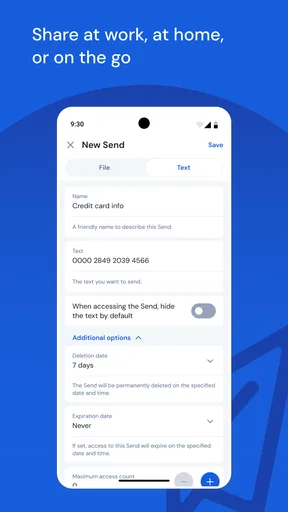
- Secure sharing features are limited on the free plan.
- Importing data from some password managers may need manual adjustments.
- Account recovery is difficult if you lose your master password and recovery options.
FAQs for Bitwarden Password Manager
What is Bitwarden Password Manager and how does it work?
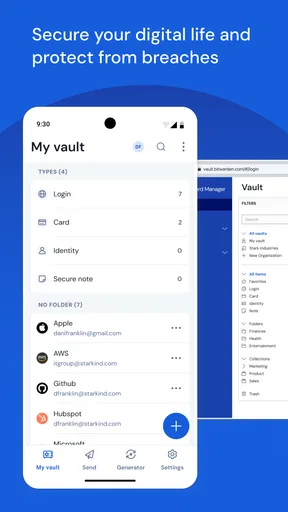
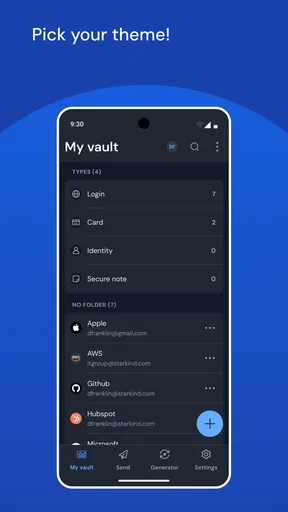
Bitwarden Password Manager is a security app that stores and organizes passwords, passkeys, secure notes, payment cards, and other sensitive information in an encrypted vault. After creating an account and setting a master password, you can access your saved data across Android, iOS, browsers, and desktop devices. The app can also generate strong passwords and fill login details automatically.
Is Bitwarden Password Manager safe to use?
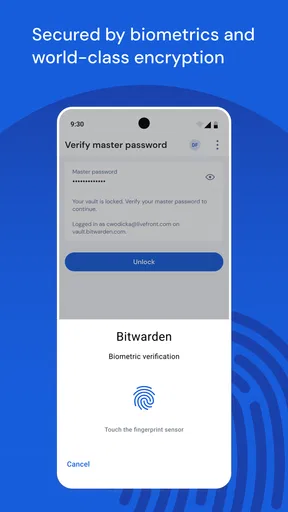
Bitwarden uses end-to-end, zero-knowledge encryption, meaning your vault is encrypted before it leaves your device and Bitwarden cannot view your stored information or master password. Security also depends on your own setup, so you should choose a long, unique master password and enable two-step login. Users should also keep recovery information stored safely because losing access can be difficult to resolve.
Does Bitwarden work across Android, iPhone, and other devices?
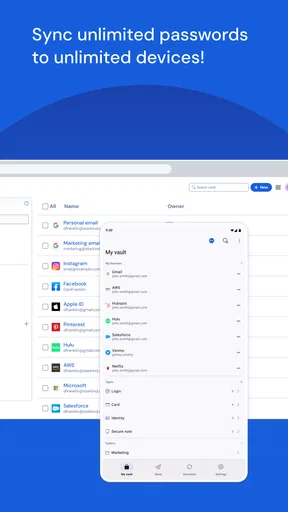
Yes. Bitwarden supports Android and iOS applications, along with browser extensions and desktop clients for major platforms. Once you sign in to the same account, your encrypted vault can synchronize between supported devices. During testing, this cross-platform approach makes it convenient to save a login on one device and use it elsewhere, although automatic filling may require enabling the relevant system permissions.
Is Bitwarden free, and what features require a subscription?
Bitwarden offers a capable free plan that includes password storage, synchronization across devices, password generation, secure notes, and basic autofill features. Premium plans add benefits such as advanced two-factor authentication options, additional security tools, expanded file attachments, and priority features. Families and organizations can choose separate plans for shared vaults, account management, and controlled access between members.
Can Bitwarden automatically fill passwords and generate new ones?
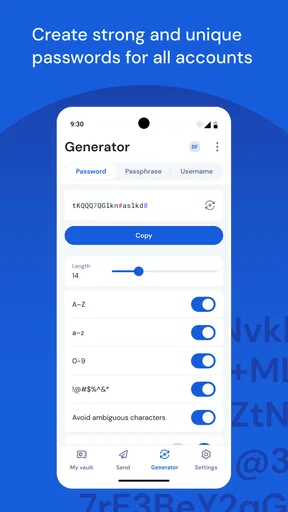
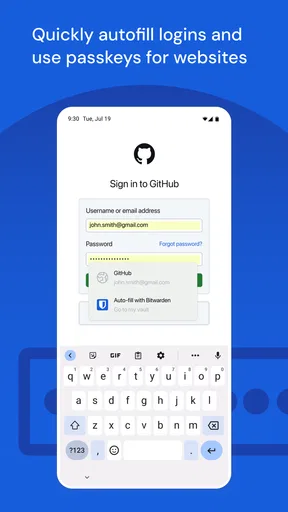
Bitwarden can detect login forms and fill saved usernames and passwords, which reduces the need to copy sensitive information manually. It also includes a password generator for creating random passwords with adjustable length and character types. On Android and iOS, you may need to activate Bitwarden as the preferred password manager and grant autofill permissions before these features work reliably in every application or browser.


